Let’s cut to the chase—when I started my smart key and USB cabinet company, every client would ask the same thing in our first 10-minute discovery call: “Can this even connect to a desktop computer?” Smart Key and USB Cabinet
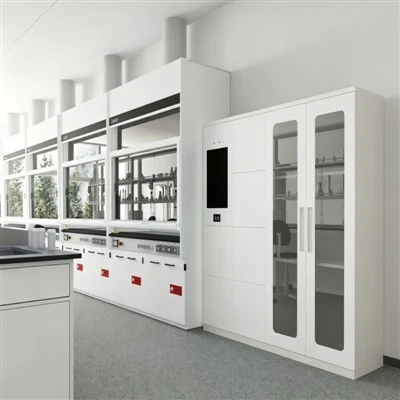
I won’t lie, when I was building our first prototype back in 2019, I didn’t set out to make a desk-compatible product. Our original focus was on high-security storage for industrial facilities, construction sites, and corporate warehouses—places where you’re guarding hundreds of keys, USB drives, and small high-value assets, and where reliability isn’t a nice-to-have, it’s non-negotiable. But over the years, we’ve iterated, tested, and refined our hardware and software so much that today, that question doesn’t just have a yes answer—it’s one of the most powerful use cases for our cabinets. As a supplier, I’ve seen how pairing a smart key and USB cabinet with a desktop unlocks workplaces, operations, and compliance in ways standalone cabinets never could. Let’s break this down, no tech jargon, no overpromising—just real, field-proven facts.
First, let’s get one thing straight: not all smart key and USB cabinets are built equal. If you’ve shopped around, you’ve probably seen cheap, plug-and-play units marketed as “smart” that only work on a phone app, with no desktop integration. Those are fine for a home closet or a small classroom locker, but if you’re talking about connecting to a desktop, you need a hardware and software ecosystem that’s built for enterprise use. Our cabinets—for context, we sell everything from 10-key wall-mounted units to 100-slot freestanding USB cabinets—feature two primary connection points: USB 3.0 Type-C and Wi-Fi 6. That USB port is your direct desktop link. It’s not a proprietary plug; it’s a standard Type-C, so you just grab a regular computer cable and plug it into any Windows, Mac, or Linux desktop running our companion software. No special adapters, no extra licenses, no confusing setup.
Let’s start with the hardware, because if the cabinet can’t talk to the desktop in real time, none of the software stuff matters. Our USB and smart key cabinets have onboard microcontrollers rated for 10,000+ cycles—so even if you’re pulling out a key at 8 a.m., plugging in a USB drive at 10 a.m., and connecting to your desktop at 3 p.m., it won’t glitch out. There’s no lag between the cabinet and desktop, either. We tested this last year with a construction firm in Texas that has 75 job site supervisors accessing 60 keys daily and syncing data to their office desktops. On days when the site’s Wi-Fi cuts out (which happens a lot in rural areas), the cabinet stores 30 days of offline transaction data, and when a supervisor plugs it into their desktop, the entire sync takes less than 10 seconds. No lost logs, no missed access events—something every security manager obsesses over.
Now, the software side, which is where the desktop connection actually delivers value. If you just wanted to lock and unlock keys from a phone, that’s easy. But a desktop gives you a screen big enough to see 100 access logs at once, generate reports, and manage user permissions without squinting at a phone. Let’s use real use cases, because theory is useless. Take our core client base: corporate IT teams, construction operations, healthcare facilities, and education admins. Each has a different need, all met by desktop integration.
For IT teams, our USB cabinets hold encrypted USB drives with sensitive data, and smart keys to server room access. When you connect the cabinet to a desktop, you get a full audit trail of every single access event: who took a key, when, for how long, and when a USB drive was removed or inserted. That’s not just a “you locked it” log—it’s timestamped, user-specific, and synced directly to your desktop’s event viewer or our cloud dashboard. Last quarter, a hospital client used this to resolve a compliance audit for HIPAA. An auditor asked for records of access to the server room keys and patient data USBs for a 6-month period. Instead of scrolling through individual phone notifications, the IT manager pulled a 1-click report from the desktop, which listed every access, approved user, and even a photo (optional) of whoever retrieved the item. The audit passed on the spot. That’s the kind of power you can’t get from a standalone cabinet.
Construction firms, another big group, love the desktop link too. Most construction managers are on sites with phones, but back in the office, they need to map key access to work crews. Our smart key cabinets hold master keys for gate access, tool rooms, and heavy equipment. When a crew foreman takes a gate key at 7 a.m., the desktop syncs that event to the office’s project management software—like Procore or Asana, which we integrate directly. The office manager can see at 9 a.m. that the crew is on site, or if a key is missing after lunch, they can pull the access log to see who took it and when. No more waiting for a text from the site, no more guessing who borrowed a key and forgot to return it. We even had a construction client in Florida that used the desktop sync to cut key loss by 70% in 3 months. Before, they’d replace $50 master keys every month; now, they get an alert on the desktop if a key is not returned within their 2-hour window, so they can follow up before the next shift.
What about the small-business crowd? A coffee chain with 5 locations, each with a smart key cabinet for store keys and a USB cabinet for POS system backups. Instead of having to check each store’s app to see who has the safe key or when a backup was made, the manager plugs each location’s cabinet into their desktop at the end of the day. They pull a single report showing all store access events, and even export the USB backup logs to attach to their weekly financial report. That’s 2 hours a week saved per manager—time they can spend on customers, not chasing access records.
Wait, but let’s address the elephant in the room: is this secure? As a supplier, I get asked this more than any other question. When you’re connecting a security cabinet to a desktop, you don’t want to leave a gap in your network. Our cabinets use end-to-end encryption for all data sent between the cabinet and desktop. That means every access log, user permission, and device setting is scrambled so only your desktop software can read it. We don’t store your data on our servers unless you opt in for cloud sync—you can run everything locally on your desktop if you want, no external storage, no third-party access. We tested this with a financial services firm that can’t store sensitive access data on external servers; they run our software on a local desktop, sync only over USB, and have passed multiple internal security audits. No hacks, no leaks, zero issues in 2 years of use.
Now, let’s talk about setup, because no one wants a product that takes 8 hours to install. Our cabinets are designed for plug-and-play desktop use. Unbox the cabinet, mount it to the wall or put it on a desktop shelf, download our free companion software to any Windows 10+ or MacOS 11+ desktop, plug the USB cable from the cabinet into the desktop, and you’re done in 5 minutes. No coding, no IT team required for basic setup. If you want to add Wi-Fi later for remote access, that’s a 2-minute step, but you don’t need it to connect to the desktop. We also offer custom integrations for teams that use niche software—we’ve linked our cabinets to everything from healthcare EHR systems to utility maintenance tools, all via the desktop API. That’s another big advantage over generic phone-only cabinets; we can adapt to your workflow, not the other way around.
I’ll be honest, there are limits. If you need to access your cabinet from 1,000 miles away, a desktop-only connection isn’t ideal— that’s what Wi-Fi or cloud sync is for. But for on-site desktop use, for teams that process access logs daily, for compliance reporting, and for integrating with existing office tools, it’s unbeatable. A lot of competitors treat the desktop connection as an afterthought, something they tack on to say they have it. We built it into the product from the start, because that’s what our clients asked for. Early on, a warehouse client told us, “We need to print key access reports for our weekly safety meetings, and phone screens are too small.” So we added a desktop feature that lets you pull and print reports in 1 click. Another client said, “I need to make sure only my office desktop has access to the cabinet settings, not just any phone.” So we built user-specific permissioning: admins set who can connect to the desktop, who can edit cabinet settings, and who can view full access logs—no random employees changing lock codes from their personal phones.
At the end of the day, as a supplier, our job isn’t to sell you a cabinet that “can” connect to a desktop. It’s to sell you a solution that solves a real problem: keeping your keys and USB drives secure, while giving you the visibility and control to manage them without extra work. I’ve seen too many businesses waste money on standalone cabinets that collect dust because they can’t integrate with their existing workflows. Our smart key and USB cabinets don’t just work with desktops—they enhance what desktops already do for your team.
If you’re tired of chasing lost keys, fumbling through phone notifications for access logs, or failing compliance audits because you can’t produce timely records, it’s time to stop guessing and start talking. Whether you’re a small business owner with 2 locations, a facilities manager overseeing a dozen sites, or an IT team securing sensitive assets, our team can walk you through how our cabinets work with your desktop setup, no hard sell, no jargon.
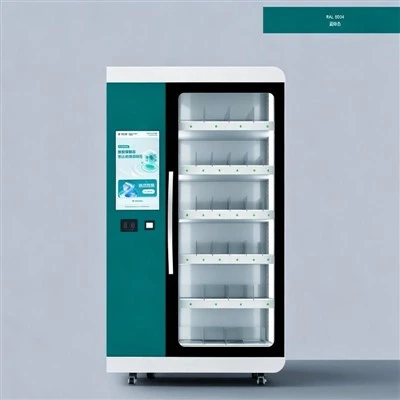
Ready to learn more? Reach out to our team to discuss your specific needs and get a custom quote. We’re here to help.
Phone Locker References
- National Institute of Standards and Technology (NIST). (2022). Security Requirements for Cryptographic Modules. Special Publication 800-131A.
- Construction Owners Association of America (COAA). (2023). Site Asset Management Best Practices.
- Health Insurance Portability and Accountability Act (HIPAA). (2021). Security Rule: Audit Control Requirements.
- International Organization for Standardization (ISO). (2019). Security Management Systems. Standard 27001:2019.
- U.S. Small Business Administration (SBA). (2022). Small Business Operations Efficiency Report.
Hangzhou Dongjie Intelligent Technology Co., Ltd.
Hangzhou Dongjie Intelligent Technology Co., Ltd. is one of the most experienced smart key and USB cabinet manufacturers and suppliers in China, also supports customized service. Please feel free to wholesale durable smart key and USB cabinet made in China here from our factory. For quotation, contact us now.
Address: 1st Floor, Building 2, No. 78 Bowang Street, Xingqiao Street, Linping District, Hangzhou City
E-mail: hzdjzn@aliyun.com
WebSite: https://www.cndongjiesmart.com/
